
Views: 0 Author: Site Editor Publish Time: 2026-07-29 Origin: Site


The most common cause of premature failure in edge computing deployments is not software instability, but inadequate thermal management. Deploying high-performance processing power in non-climate-controlled, harsh environments creates a direct conflict between compute demands and physical degradation. Thermal throttling, component failure, and dust ingress quickly compromise systems that are not engineered for their specific surroundings. Selecting the correct thermal architecture requires moving beyond basic specification sheets. You must evaluate the fundamental engineering differences between active and passive cooling systems and understand how they align with specific environmental and operational realities. Properly matching the hardware to the environment ensures sustained performance and prevents catastrophic hardware failures on the factory floor or remote deployment site.
Environmental Dictation: The deployment environment (dust, vibration, ambient temperature, space constraints) must dictate the cooling architecture before processing requirements are finalized.
Compute vs. Reliability Trade-off: Active cooling supports higher Thermal Design Power (TDP) for intensive workloads, but introduces mechanical failure points and ingress vulnerabilities.
The Fanless Advantage: Passive cooling eliminates moving parts, enabling high IP ratings, silent operation, and drastically improving Mean Time Between Failures (MTBF) in harsh settings.
Hybrid Solutions: Modern industrial PC thermal management increasingly leverages hybrid architectures to provide a reliable, silent foundation with active cooling overrides for high load edge computer tasks.
Hidden Cost Factors: While passive systems often carry higher upfront engineering costs, actively cooled systems incur ongoing maintenance costs (filter replacements, fan failures) and higher risks of unplanned downtime.
Modern CPUs, GPUs, and NVMe drives generate significant heat during operation, measured as Thermal Design Power (TDP). In a controlled data center, managing this heat is straightforward because ambient temperatures are strictly regulated. At the edge, transferring that heat to the ambient environment becomes a complex engineering challenge. If the heat generated by the silicon cannot escape the chassis faster than it is produced, the components will automatically reduce their clock speeds to prevent melting. This thermal throttling severely degrades processing performance, leading to latency and system instability. Effective industrial PC thermal management focuses on creating highly efficient pathways to move thermal energy away from critical integrated circuits.
When you place a computer inside a steel mill, an outdoor telecom cabinet, or a heavy machinery control panel, the baseline ambient temperature is already elevated. The processor still generates the same amount of heat, but the environment is less capable of absorbing it. This means the internal cooling mechanisms must work significantly harder. Engineers must account for peak summer temperatures, direct solar loading on outdoor enclosures, and the heat generated by adjacent equipment inside the same cabinet.
Heat transfer in industrial computing relies on three fundamental physical processes. Conduction involves direct heat transfer from PCB components through thermal interface materials (TIMs) directly to the chassis. Convection is the transfer of heat via air movement, which can occur through natural buoyancy or forced fan induction. Radiation involves the emission of heat from the external surfaces of the enclosure into the surrounding environment. Engineering a reliable system requires optimizing all three methods based on the physical constraints of the deployment site.
Heat Transfer Method | Mechanism in Industrial PCs | Primary Application |
|---|---|---|
Conduction | Thermal pads and copper pipes moving heat from the CPU die to the external aluminum chassis. | Core mechanism for all fanless systems. |
Convection (Natural) | Hot air rising off the external chassis fins, pulling cooler air upward. | Secondary mechanism for fanless systems in open air. |
Convection (Forced) | Mechanical fans blowing ambient air directly across internal or external heat sinks. | Primary mechanism for actively cooled systems. |
Radiation | Heat emitting outward from the dark, anodized surface of the metal enclosure. | Passive dissipation in all metal-chassis computers. |
Establishing baseline requirements for edge deployments is necessary before selecting hardware. A successful thermal design must guarantee zero thermal throttling under sustained peak loads. It must maintain all internal component temperatures well within safe operating margins, typically below 85°C for industrial-grade silicon. Furthermore, the thermal solution must not compromise environmental isolation. If a system requires ventilation holes to cool down, it immediately becomes vulnerable to moisture and particulate ingress, which defeats the purpose of ruggedized hardware.
We see many failures in the field where integrators specify a system based solely on CPU benchmarks without considering the thermal envelope. A 65W processor will outperform a 15W processor in a 22°C office. However, if you put both inside a sealed box on a factory floor where the ambient air is 45°C, the 65W processor will overheat and throttle down to a fraction of its base clock speed. In that scenario, the lower-wattage processor actually delivers better, more consistent performance because it stays within its thermal limits.
Delta T (ΔT) represents the difference between the internal component temperature and the external ambient temperature. This metric is the most critical factor for evaluating any cooling solution. Heat only flows from a warmer area to a cooler area. If a computer is deployed in a facility where the ambient air is 60°C, the cooling system has a very narrow Delta T to work with before the CPU reaches its maximum threshold. Understanding the maximum ambient temperature of the deployment site is mandatory for calculating whether a specific cooling architecture can sustain the required processor load.
Active cooling relies on forced convection. Fans, blowers, or liquid-assisted loops rapidly move ambient air across internal heat sinks to dissipate thermal energy. When evaluating a passive vs active cooling industrial PC, active systems prioritize maximum airflow. Upgraded technologies in the industrial sector include the implementation of Magnetic Levitation (MagLev) fans. These fans extend operational lifespans and reduce mechanical wear compared to traditional sleeve bearings. Modern active systems also utilize variable fan curves and dedicated thermal sensors to dynamically manage high-wattage spikes, spinning up only when the processor demands maximum thermal relief.
The internal layout of an actively cooled industrial PC is designed to channel air over the hottest components first. Intake fans pull cool air through a front filter, push it through the CPU and GPU heat sink fins, and exhaust the hot air out the back. This continuous exchange of air allows the system to handle processors with TDPs exceeding 125W, making it possible to run desktop-class or server-class hardware outside of a traditional data center.
Actively cooled systems thrive in environments where the air is clean and temperatures are somewhat regulated. Climate-controlled server racks, clean rooms, and temperature-regulated enclosures are ideal locations. They are also necessary for applications requiring a high load edge computer. Complex AI inference, multi-camera machine vision, and real-time predictive modeling demand high-wattage processors that generate too much heat for passive dissipation alone.
Consider a quality control station in a semiconductor manufacturing plant. The environment is highly controlled, free of dust, and kept at a constant 20°C. The application requires processing high-resolution images from six different cameras simultaneously to detect microscopic defects. This requires a dedicated GPU and a high-end CPU. An actively cooled system is the only logical choice here because the environment poses no threat to the fans, and the compute requirements exceed what a passive system can handle.
The primary limitation of active cooling is mechanical wear and tear. Fans have a finite lifespan and represent a single point of failure. These systems are highly vulnerable to airborne particulates like dust, oil, and metal shavings. These contaminants get pulled into the chassis, coating internal components and insulating heat, which causes rapid failure. Furthermore, active cooling systems are sensitive to high-frequency vibrations that can damage moving fan bearings over time.
Filters clog rapidly in dirty environments, restricting airflow and causing immediate temperature spikes.
Fan bearings wear out, leading to increased noise, reduced RPMs, and eventual mechanical seizure.
Moisture in the air can be drawn into the chassis, leading to condensation on the motherboard and short circuits.
Corrosive gases present in chemical plants will be pulled directly over sensitive copper traces, accelerating degradation.
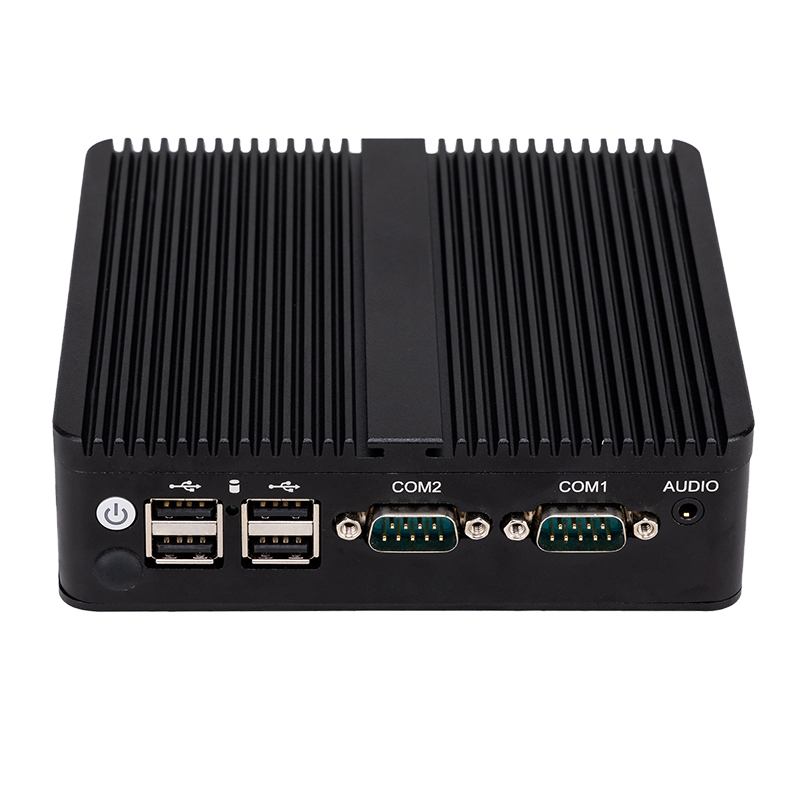
A fanless industrial computer relies entirely on natural convection and conduction. Advanced thermal technologies are integrated directly into the chassis. Engineers utilize copper vapor chambers, specialized phase change materials (PCMs), and advanced thermal vias on the printed circuit board to move heat rapidly away from processing hot spots. The external architecture typically features an extruded aluminum chassis with heavy finning to maximize external surface area. Internally, copper heat pipes, high-conductivity thermal pads, and direct-die contact route heat efficiently to the external chassis, turning the entire computer enclosure into a giant heat sink.
The manufacturing process for these chassis is precise. The aluminum must be extruded with specific fin pitches and depths to optimize natural convection. If the fins are too close together, air gets trapped and insulates the chassis. If they are too far apart, there isn't enough surface area to dissipate the heat. The internal thermal blocks must be machined to exact tolerances to ensure perfect contact with the CPU die, as even a microscopic air gap will ruin the thermal transfer efficiency.
Passive cooling is mandatory for the quintessential dusty factory computer. Environments like sawmills, CNC machining floors, and textile plants possess airborne debris that would instantly clog air filters. Fanless designs are also ideal for tight, confined spaces such as HMI panel walls, electrical cabinets, and small kiosks where airflow is restricted. High-vibration environments, including rolling stock, in-vehicle fleet management, and heavy machinery, benefit greatly from the lack of moving parts. Additionally, noise-sensitive environments like medical diagnostic areas and laboratories require the completely silent operation that only passive cooling can provide.
In a sawmill, fine wood dust permeates the air. If you deploy a computer with a fan, that dust will be sucked inside within hours. It will coat the motherboard, insulate the components, and cause a thermal shutdown. A fanless system, completely sealed against the environment, ignores the dust entirely. The heat dissipates through the external fins, and the internal components remain pristine.
Passive cooling enforces strict TDP ceilings. These systems generally cannot support top-tier, high-wattage desktop or server processors without aggressive throttling. They rely heavily on ambient air flow around the external chassis; performance degrades significantly if the unit is placed in a sealed, unventilated box with no ambient air exchange. Furthermore, fanless computers often have a larger physical footprint and heavier weight due to the required mass of the extruded aluminum heat sink.
Hybrid thermal architectures combine a rugged, conductive fanless foundation with a smart, secondary active fan loop. This approach bridges the gap between environmental resilience and maximum processing power. The core system is sealed and relies on passive conduction to cool the primary components, while an external, IP-rated fan module provides forced convection across the exterior heat sink fins.
This design isolates the sensitive electronics from the outside world while still benefiting from forced airflow. The fans blow air over the outside of the sealed chassis, rather than through the inside. If the external fan fails or gets clogged with mud, the system doesn't immediately die; it simply reverts to its baseline passive cooling capacity, which is usually enough to keep the system running at a reduced clock speed until maintenance can be performed.
Under standard workloads, the system operates entirely passively, delivering silent, reliable, and dust-resistant operations. The external IP-rated smart fans remain dormant. They engage only when the system encounters extreme processing spikes or when external ambient temperature thresholds are breached. This preserves the lifespan of the mechanical fans while providing a safety net against thermal throttling.
Hybrid designs are perfectly suited for outdoor edge AI gateways that process intermittent heavy workloads under direct sunlight. They provide the necessary baseline environmental protection against rain and dust, while ensuring that temporary spikes in compute demand do not crash the system during peak daylight temperatures. For example, an automated license plate reader at a toll booth might sit idle for minutes at a time, relying on passive cooling. When a convoy of trucks passes through, the CPU spikes to process the images. If it's a hot summer day, the external fans kick on for thirty seconds to clear the excess heat, then shut down again.
Evaluating the appropriate cooling architecture requires a direct comparison of capabilities across performance, environmental resilience, and maintenance requirements. You must weigh the processing demands of your software against the physical realities of your deployment site.
Evaluation Criteria | Active Cooling | Passive Cooling (Fanless) |
|---|---|---|
Performance & Processing Power | Can sustain maximum clock speeds for 65W–125W+ processors. Ideal for heavy AI and machine vision. | Typically restricted to 15W–35W embedded processors. Requires highly optimized software for edge outcomes. |
Environmental Resilience | Inherently difficult to seal. Requires external vents and filters. Disqualified from true IP65/IP67 ratings. | Allows for completely sealed, ventless designs. Immune to water, dust, and corrosive gases. |
Maintenance & MTBF | High maintenance overhead (filter cleaning/replacement). Higher risk of mechanical fan failure. | Near-zero thermal maintenance. Significantly longer operational lifespan due to lack of moving parts. |
Active cooling allows for the integration of high-wattage CPUs and dedicated GPUs. If your application requires rendering complex 3D models or running multiple high-definition camera streams simultaneously, active cooling provides the necessary thermal headroom. Passive cooling is generally restricted to lower-wattage embedded processors, such as Intel Core T-series or Atom/Celeron lines. Utilizing a fanless system for high-end compute requires highly optimized software and efficient code to achieve similar edge outcomes without overheating the silicon.
Active systems require airflow, meaning they must have vents. This makes them inherently difficult to seal against the elements. They rely on filters that must be changed regularly. Passive systems allow for completely sealed designs. Because there are no vents, a fanless computer can achieve strict IP65 or IP67 ratings, rendering the internal components completely immune to water jets, fine dust, and corrosive industrial gases.
Actively cooled systems require regular physical intervention. Filters must be cleaned, and fans must be monitored for bearing wear. Failure to maintain an active system leads directly to thermal shutdown. Passive systems require near-zero thermal maintenance. Once deployed, they operate reliably for years without physical intervention, drastically improving the Mean Time Between Failures (MTBF) for remote or inaccessible deployments.
A common deployment error is placing a fanless industrial PC inside a sealed, unventilated NEMA enclosure. Because the PC relies on ambient air to dissipate heat, a sealed box traps that heat. The ambient air inside the enclosure heats up continuously, creating an "oven" effect until the PC thermal throttles and fails. To mitigate this, engineers must conduct thermal simulations using Computational Fluid Dynamics (CFD) tools prior to physical deployment. Utilizing cabinet coolers, heat exchangers, or ensuring adequate external surface area for the enclosure itself will prevent heat buildup.
When mounting a fanless PC inside a cabinet, you must calculate the total heat dissipation of all devices inside that cabinet. If you have power supplies, motor drives, and a fanless PC all generating heat, the internal cabinet temperature will rise rapidly. You must either size the cabinet large enough to dissipate the combined heat through its own walls, or install a closed-loop heat exchanger on the cabinet door.
Often, the CPU is adequately cooled by the chassis, but secondary components like NVMe SSDs, PoE network cards, or RAM modules overheat and fail. Heat must be managed across the entire motherboard. Mitigation requires specifying wide-temperature rated components, typically rated from -40°C to 85°C. Furthermore, ensure the internal thermal block design includes dedicated thermal pads and conductive routing to pull heat away from all critical integrated circuits, not just the primary processor.
The debate between passive and active cooling is not about which is universally superior, but which is architecturally appropriate for the specific deployment. Environmental hazards dictate the cooling method, and the cooling method subsequently dictates the available compute capacity. If the environment features dust, debris, moisture, heavy vibration, or tight spaces, a passive, fanless design is mandatory. If the environment is clean and temperature-controlled but requires massive localized compute, active cooling is the correct choice. For harsh environments that require intermittent high-power bursts, hybrid solutions offer the best balance.
Audit the physical deployment site for ambient temperature maximums, airflow restrictions, and particulate risks before selecting hardware.
Calculate the total required Thermal Design Power (TDP) for your specific software workload to ensure the chosen cooling method can handle the heat.
Consult with an industrial hardware engineer to run thermal simulations and verify enclosure sizing.
Match the chassis design and IP rating strictly to your environmental constraints to prevent ingress failures.
Thermal design dictates the long-term reliability of your edge computing deployments. At MeetNeng, we don't believe in one-size-fits-all. We offer a comprehensive lineup of both high-performance [actively cooled industrial PCs] for heavy vision processing and rugged, IP67-sealed [fanless industrial computers] for extreme dust and vibration. Our engineering team can help you run thermal simulations and choose the exact cooling solution to match your environment.
A: Most industrial-grade fanless computers are engineered to operate reliably in ambient temperatures ranging from -40°C up to 70°C, and sometimes 85°C, depending on the specific internal components and the size of the external heat sink.
A: Yes, but only if it is placed inside a sealed, climate-controlled NEMA enclosure. Deploying an actively cooled PC directly on a dusty factory floor will cause the fans and internal components to quickly clog with debris, leading to overheating and failure.
A: Passive cooling prevents throttling by utilizing highly conductive materials, like copper heat pipes and large aluminum extruded fins, to rapidly draw heat away from the processor and dissipate it into the surrounding ambient air without relying on moving parts.
A: Yes. Hybrid solutions use a sealed, passively cooled chassis for standard operations and incorporate external, IP-rated smart fans that activate only when the processor hits peak loads, providing extra thermal relief without exposing internal components to dust.
A: Fanless PCs require custom-milled aluminum chassis, precise internal copper heat routing, and specialized thermal interface materials to guarantee that heat transfers efficiently from the silicon to the outside air without the assistance of forced airflow.
A: Engineers use Computational Fluid Dynamics (CFD) software to model the heat generated by the PC's components against the volume of the enclosure, factoring in external ambient temperatures and airflow to ensure the system will not overheat.


