
Views: 0 Author: Site Editor Publish Time: 2026-08-30 Origin: Site


Deploying fragile consumer-grade devices in high-velocity logistics centers introduces a massive operational tax. Shattered screens, dead batteries mid-shift, and disconnected workflows severely disrupt peak operations. The core problem stems from fragmented data capture across receiving, putaway, cycle counting, and picking. This fragmentation leads to inventory discrepancies, delayed order fulfillment, and reduced labor productivity as workers waste time walking to fixed terminals. Purpose-built rugged devices bridge the gap between physical material handling and real-time data synchronization. Acting as virtual workstations that move directly with the user, a Warehouse Rugged Tablet keeps your workforce connected exactly where the work happens. We will explore the technical criteria required to evaluate the right device for your specific operational footprint, ensuring tight integration with your infrastructure.
The Virtual Workstation Advantage: A true WMS mobile tablet terminal eliminates "motion waste" by providing full desktop-level WMS access directly on forklifts, picking carts, or in the yard.
Workflow Alignment: Devices must be configurable to specific tasks—ranging from vehicle-mounted receiving stations to lightweight handheld picking operations.
Non-Negotiable Hardware: Integrated barcode scanning, glove-compatible touchscreens, and hot-swappable batteries are baseline requirements for continuous multi-shift operations.
Architecture & Security: Operating System selection (Windows vs. Android) dictates WMS compatibility, security patching protocols, and Mobile Device Management (MDM) deployment strategies.
Logistics facilities present harsh realities that instantly compromise standard electronics. Devices routinely face drops onto concrete floors from forklifts or high racking. Temperature fluctuations add another layer of stress. Moving a device from a sub-zero cold storage freezer directly to a humid loading dock causes internal condensation. Standard tablets lack the conformal coating on their motherboards to survive this thermal shock. Furthermore, pervasive dust, cardboard particulates, and exhaust fumes infiltrate unsealed chassis, leading to overheating and component failure. You cannot expect a device built for a living room to survive a cross-docking operation.
Consumer tablets are designed for static environments. Their failure points in industrial settings are immediate and predictable. Fragile charging ports degrade rapidly when plugged and unplugged dozens of times a shift by operators wearing heavy gloves. Their internal Wi-Fi antennas lack the gain required to maintain connections in metal-dense areas like narrow aisle racking. Standard devices also lack native peripheral integration. Relying on camera-based scanning or flimsy Bluetooth dongles introduces unacceptable latency during high-volume scanning tasks. Every second a worker spends waiting for a camera to focus on a barcode is a second lost in productivity.
Evaluating hardware requires looking beyond the initial specification sheet. While standard tablets appear capable on paper, their operational reality tells a different story. You must account for the rapid replacement cycle. A consumer device typically survives less than six months in a heavy industrial environment. More importantly, you must calculate the impact of worker downtime. When a tablet fails mid-task, the operator loses time retrieving a spare, logging back into the system, and recovering lost session data. Enterprise-grade hardware mitigates these disruptions, ensuring continuous uptime and reliable data capture across multiple shifts.
Feature Category | Consumer-Grade Tablet | Enterprise Rugged Tablet |
|---|---|---|
Chassis Construction | Glass and thin aluminum; requires aftermarket cases. | Magnesium alloy frame, rubberized bumpers, Gorilla Glass. |
Power Architecture | Sealed internal battery; requires tethered charging. | Hot-swappable batteries; multi-bay charging cradles. |
Data Capture | Standard camera; slow autofocus, struggles in low light. | Dedicated 1D/2D laser or imager scan engines. |
Lifecycle Support | 1-2 years of OS updates; rapid model deprecation. | 5-7 years of guaranteed hardware support and security patches. |
The receiving dock sets the pace for the entire facility. Success here requires rapid verification of inbound manifests, real-time system updates, and immediate access to stock level data. Operators need devices that mount easily to stand-up forklifts or receiving carts. Large, high-visibility screens ranging from 10 to 12 inches are necessary to display complex Advance Shipping Notices (ASNs) without constant scrolling. Robust I/O ports are also critical. Receiving stations often require tethered peripherals like dimensioning scales or heavy-duty label printers to process incoming freight efficiently.
Scan the inbound pallet license plate to pull up the ASN.
Verify physical quantities against the digital manifest on the large display.
Trigger a tethered printer to generate internal routing labels.
Update the WMS instantly to make the inventory available for allocation.
Once freight is received, directed putaway relies on accurate bin-location mapping and optimized routing for forklift operators. Devices used for putaway must endure constant vehicle vibration. They require MIL-STD ratings specifically tested for vehicular mounting. Seamless Wi-Fi roaming is equally critical. As a forklift travels across different warehouse zones, the tablet must jump between access points without dropping the active session. Fast processing power ensures that the system syncs in real time, preventing two operators from attempting to place pallets in the same location.
Cycle counting demands high-speed, accurate data capture without causing worker fatigue. For this workflow, a dedicated barcode inventory tablet is highly effective. Success criteria include integrated 1D/2D imagers capable of reading damaged or poorly printed labels from a distance, even through layers of stretch wrap. Because cycle counters walk the aisles for hours, lightweight ergonomic design is paramount. Accessories like rotating hand straps and pistol grip attachments allow for comfortable one-handed operation, keeping the other hand free to move merchandise or adjust racking.
Order picking requires error-free assembly and rapid packing verification. Flexibility is the primary requirement here. Tablets must be wearable or easily mountable to picking carts. Fast scan engines are necessary for high-volume piece picking. Visual picking aids, such as color-coded screen prompts and large touch targets, help reduce cognitive load on the picker. This visual clarity drastically reduces mispicks and accelerates the training process for seasonal temporary workers.
Shipping workflows extend beyond the four walls of the facility. Success involves accurate truck loading, proof of dispatch, and transitions from indoor to outdoor environments. Tablets used in the yard require high-nit displays that remain readable in direct sunlight. WWAN (4G/5G) connectivity is essential, as Wi-Fi rarely covers the entire trailer yard. High-resolution rear cameras are also necessary to document load conditions, providing photographic proof that outbound freight was secured properly before the trailer doors were sealed.
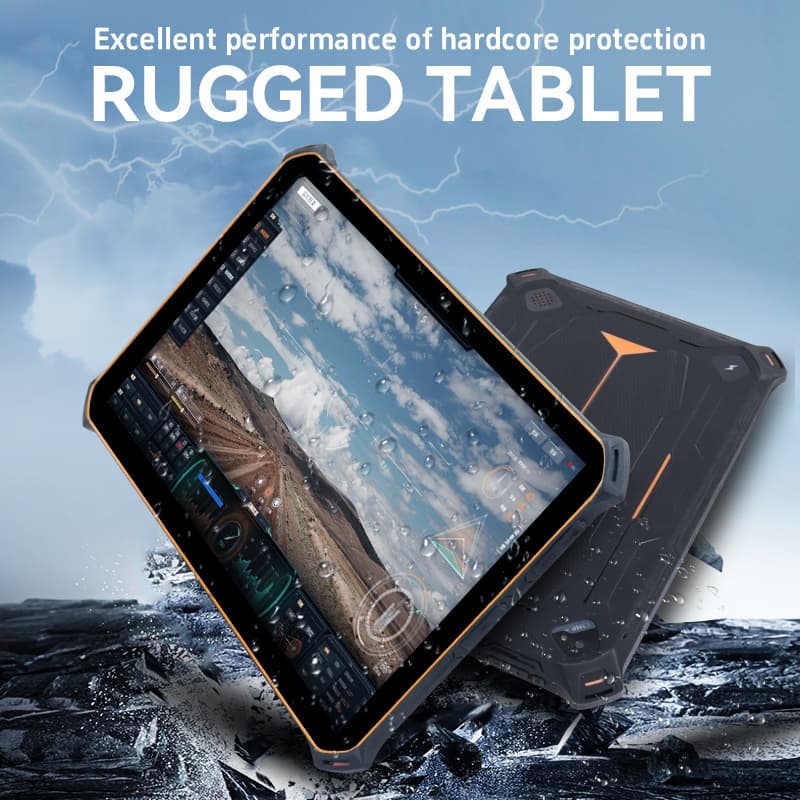
Understanding industrial protection ratings prevents over-specifying or under-specifying your hardware. Ingress Protection (IP) ratings define how well a device seals out dust and moisture. An IP65 rating serves as the baseline for standard indoor facilities, offering total dust protection and resistance to low-pressure water jets. If your operations involve outdoor yard management in heavy rain or washdown procedures in food-grade facilities, upgrading to IP67 or IP68 becomes necessary. MIL-STD-810G/H standards translate military testing into practical logistics realities. Look for a warehouse rugged tablet specifically tested for transit drops onto concrete, sustained mechanical shock, and the specific vibration frequencies generated by internal combustion forklifts.
IP Rating | Solid Protection | Liquid Protection | Best Use Case |
|---|---|---|---|
IP54 | Dust protected (limited ingress). | Protected against splashing water. | Light retail backrooms, clean storage. |
IP65 | Dust tight (no ingress). | Protected against water jets. | Standard warehouse, manufacturing floors. |
IP67 | Dust tight. | Protected against temporary immersion. | Yard management, outdoor loading docks. |
IP68 | Dust tight. | Protected against continuous immersion. | Food processing, chemical washdown areas. |
Standard capacitive touchscreens fail when introduced to industrial personal protective equipment (PPE). Enterprise tablets utilize advanced touch controllers that allow for glove and wet-touch compatibility. Workers can interact with the screen accurately while wearing thick leather riggers or nitrile gloves, even if the screen has condensation on it. Visibility is another crucial dimension. Moving from dimly lit racking aisles to sunlit loading docks requires a display with high brightness, typically exceeding 800 nits, combined with optical bonding. Anti-glare coatings reduce reflections, preventing eye strain and ensuring operators can read picking instructions instantly.
Consumer devices require tethered charging, which removes them from the workflow. Industrial operations require continuous uptime. Hot-swappable battery architecture is an operational necessity. These systems use a small internal bridge battery that keeps the device powered for a few minutes while the main battery is removed and replaced. This eliminates charging downtime entirely. You must also evaluate the charging infrastructure. Multi-bay charging cradles manage spare batteries efficiently in the IT room. Vehicle-powered docks keep devices charged directly from the forklift battery. Desktop docking stations allow the tablet to function as a fixed PC for supervisors.
Warehouses are notoriously difficult RF environments. Steel racking, chain-link cages, and dense liquid inventory absorb or reflect signals. Wi-Fi 6 capabilities and seamless Access Point (AP) roaming protocols, specifically 802.11r, 802.11k, and 802.11v, are mandatory. They ensure the device maintains a persistent connection to the host server while traveling at speed across the facility. For operations that extend beyond the Wi-Fi footprint, WWAN (4G/5G) and dedicated GPS modules are required. These features enable location tracking and real-time data syncing for yard management, inter-facility transit, and direct-to-store delivery routes.
Selecting the right operating system dictates your entire deployment strategy. Windows remains the standard for legacy systems and complex multitasking. It allows for full desktop application mirroring and serves as a true desktop replacement when docked in a supervisor's office. Android has become the dominant choice for modern, web-based, or app-based warehouse management systems. Android offers an intuitive user interface that drastically lowers training time for new hires. It also provides strict application sandboxing for enhanced security.
Feature | Windows IoT Enterprise | Android Enterprise |
|---|---|---|
WMS Compatibility | Ideal for legacy, heavy-client, and terminal emulation. | Ideal for modern web apps and native mobile applications. |
User Interface | Familiar desktop experience; better for complex multitasking. | Touch-first, smartphone-like experience; faster onboarding. |
Device Management | Managed via SCCM, Intune, or standard Windows tools. | Managed via specialized MDM (SOTI, Workspace ONE). |
Hardware Ecosystem | Typically heavier devices; robust peripheral support. | Lighter form factors; extensive rugged mobile options. |
A properly configured WMS mobile tablet terminal can often replace traditional handheld gun scanners. Evaluating this transition requires analyzing your scan volume and ergonomic requirements. For low-to-medium volume scanning, an integrated 2D imager on the tablet is highly efficient. For high-velocity, hands-free picking, you can pair the tablet with Bluetooth ring scanners or RFID sleds. This keeps the worker's hands completely free while the tablet displays the necessary routing and item data. Additionally, the tablet's high-resolution camera provides utility for proof of condition, allowing workers to instantly document damaged inbound freight before accepting a delivery.
Deploying a fleet of devices without a centralized management strategy creates massive IT bottlenecks. The primary risk involves inconsistent security policies and manual update processes that require IT staff to physically touch every device. To mitigate this, ensure the chosen hardware supports zero-touch enrollment. The devices must integrate with enterprise MDM platforms like SOTI MobiControl or VMware Workspace ONE. This integration allows IT to push firmware updates remotely, troubleshoot issues via remote control, and lock the devices into a dedicated kiosk mode that prevents workers from accessing unauthorized applications.
Even the most advanced hardware will fail if workers refuse to use it. The risk of workers abandoning devices due to weight or awkward handling is high. Mitigation requires prioritizing ergonomics from the start. Conduct pilot testing to determine the optimal form factor for specific tasks. An 8-inch tablet is generally better for handheld picking, while a 10-inch or 12-inch screen is preferable for vehicle mounting. Invest in ergonomic accessories like shoulder straps, hand straps, and vibration-dampening RAM mounts. Optimize the software UI to feature large touch targets and high-contrast text to reduce eye strain during long shifts.
Every facility has network dead zones, typically deep inside steel racking or in the far corners of the loading dock. The risk here is data loss or workflow halting when the connection drops. To mitigate this risk, evaluate the tablet's caching capabilities. Ensure that your WMS application supports an offline-sync mode or store-and-forward architecture. This allows the worker to continue scanning and processing tasks offline. Once the device re-enters an area with Wi-Fi coverage, it automatically pushes the cached data to the server without requiring manual intervention.
Map the facility using heat-mapping software to identify weak signal areas.
Configure the WMS application to cache active session data locally.
Train operators on how to recognize offline mode indicators on the tablet interface.
Establish automated sync protocols for when the device regains network connection.
Audit your current Wi-Fi infrastructure to identify dead zones and ensure your access points support fast roaming protocols.
Map out the specific ergonomic requirements for each distinct workflow to determine the correct screen sizes and mounting accessories.
Request demo units from hardware vendors to evaluate screen brightness and glove-touch responsiveness on the warehouse floor.
Conduct a 30-day pilot test in a high-stress zone, such as cold storage or the receiving dock, to measure battery performance and user acceptance.
A: Consumer tablets are built for static environments and feature fragile glass, non-replaceable batteries, and standard ports. Rugged tablets feature reinforced chassis, MIL-STD drop protection, IP-rated sealing against dust and water, hot-swappable batteries, and integrated barcode scan engines designed for continuous industrial use.
A: For standard indoor logistics centers, an IP65 rating is the baseline. It offers complete protection against dust and withstands low-pressure water jets. If your operations involve outdoor yard management, heavy rain exposure, or chemical washdowns, you should require IP67 or IP68 ratings.
A: Yes, if configured correctly. Tablets with integrated enterprise-grade 1D/2D imagers can replace gun scanners for many tasks. For high-velocity picking, pairing the tablet with a Bluetooth ring scanner provides a superior hands-free workflow while utilizing the tablet's large screen for visual data.
A: Hot-swappable systems use a small internal bridge battery built into the tablet. When the main battery is depleted, the bridge battery keeps the device powered and the network session active for several minutes. This allows the operator to swap in a fresh battery without rebooting or losing data.
A: Choose Windows if you rely on legacy terminal emulation, require full desktop application mirroring, or need the tablet to act as a docked PC workstation. Choose Android for modern, web-based applications, faster user onboarding, and a touch-first interface tailored for mobile workflows.
A: Safe mounting requires industrial-grade vehicle docks utilizing standard VESA patterns or RAM ball-and-socket mounts. These mounts incorporate vibration dampeners to protect the device from mechanical shock. The docks should also wire directly into the forklift's power supply to provide continuous charging during operation.


