
Views: 0 Author: Site Editor Publish Time: 2026-09-25 Origin: Site


If shrinking control cabinets are causing you engineering headaches, you are certainly not alone. As an automation engineer, you know the struggle firsthand. On today's factory floors, every square inch of space translates directly to operational costs. Bulky traditional computers overheat and inevitably fail in these tight, unforgiving enclosures. Yet, the demand for reliable, localized processing power has never been higher. Brute force installation is no longer an option. In this comprehensive guide, we explore practical, field-tested solutions. We will demonstrate exactly how ultra-compact computing hardware fits seamlessly into cramped automation panels without sacrificing a single drop of performance.
Form Factor is Everything: Ultra-compact, precision-engineered chassis designs maximize available space in highly crowded control panels.
Versatile Mounting Options: Flexible solutions like DIN-rail, VESA, and wall mounts allow systems to slot securely into previously unusable cabinet gaps.
Fanless Cooling: Passive cooling technology ensures the hardware will not overheat. This maintains system stability even in unventilated, tightly sealed enclosures.
Optimized Port Layout: Front-facing and consolidated ports make cable management highly efficient. This prevents wire clutter and mechanical stress on connections.
Scalable Performance: Despite their minimal footprint, modern devices offer a broad spectrum of processing power tailored specifically for edge environments.
In modern manufacturing facilities, real estate is a premium asset. Plant managers and automation engineers are under constant pressure to reduce the footprint of their machinery. By shrinking control panels and equipment enclosures, facilities can optimize floor layouts and deploy more machines in the same square footage. Ultimately, this reduces operational overhead. This drive toward miniaturization, however, creates a significant engineering bottleneck. Housing necessary control hardware in a fraction of the traditional space requires a completely new approach to system design.
Today’s industrial control cabinets are densely packed ecosystems. A single enclosure must often accommodate Programmable Logic Controllers, heavy-duty power supplies, variable frequency drives, contactors, safety relays, and terminal blocks. As automation complexity increases, the physical space left for additional hardware shrinks drastically. Integrating a standard desktop computer or a traditional rack-mount IPC into this environment is physically impossible. You simply cannot do it without violating clearance rules or requiring a costly cabinet redesign.
Recent industry analyses highlight a defining paradox in smart manufacturing. As the physical footprint of machinery shrinks, the demand for localized data processing explodes. The rapid shift toward Industry 4.0 requires deploying predictive maintenance algorithms, localized IoT connectivity, and real-time machine vision directly at the source. Engineers can no longer rely solely on distant cloud servers. Latency issues, bandwidth bottlenecks, and security concerns make cloud-only setups impractical for critical machine control. Consequently, we are forced to integrate high-level computing into legacy enclosures originally designed only for basic relays and contactors. This intersection of shrinking physical space and expanding computational demand demands a highly specialized hardware solution.
A mini industrial PC is a specialized computing device designed to deliver robust processing capabilities within a highly restricted physical footprint. Unlike standard commercial desktops that rely on bulky cases and active ventilation, these devices are engineered from the ground up for spatial efficiency. They strip away unnecessary internal voids. By utilizing custom-designed motherboards and unified chassis architectures, they achieve maximum component density.
The defining characteristic of these systems is their physical size. Typical dimensions often resemble the footprint of a paperback book or a small human palm. By keeping the depth and width to an absolute minimum, these units can be installed in shallow enclosures. You can squeeze them between existing cable ducts and power modules. Their unobtrusive profile ensures that they do not interfere with cabinet doors or block access to critical PLC terminals. Imagine troubleshooting a system at 3 AM. Having a low-profile device means you do not have to navigate a rat's nest of wires just to reach adjacent components.
This hardware is not merely a shrunken version of an office computer. It is a ruggedized piece of industrial infrastructure. The miniaturization process involves selecting industrial-grade components with high Mean Time Between Failures. These units are built to withstand severe mechanical vibration, heavy dust ingress, and the electromagnetic interference frequently generated by adjacent motor drives. The chassis is typically constructed from heavy-duty extruded aluminum, providing both structural integrity and vital environmental protection.
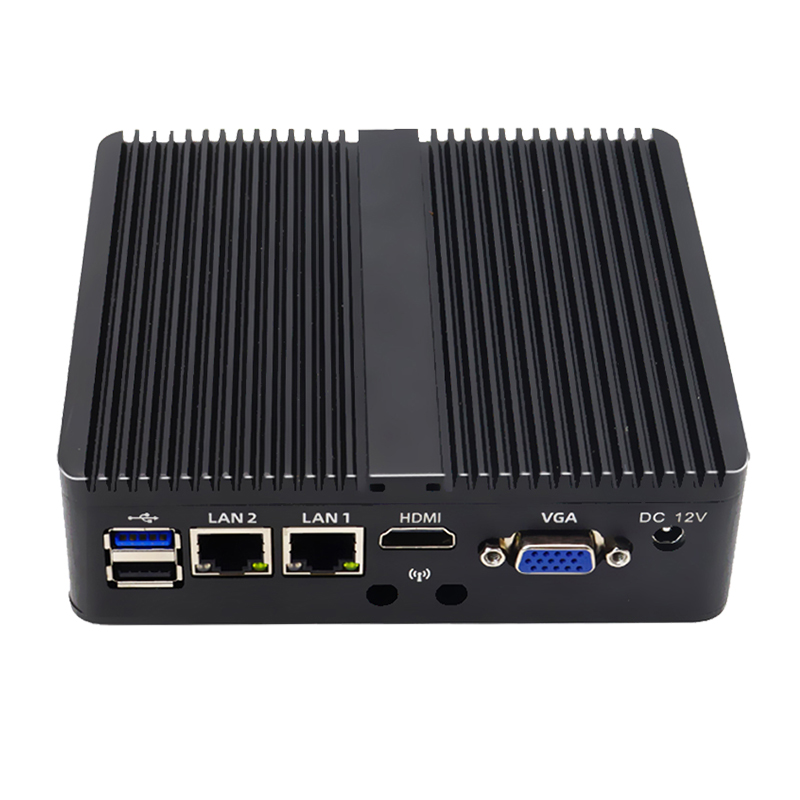
Integrating hardware into a crowded panel requires adaptable installation methods. These systems are designed with flexible mounting brackets to utilize every available cubic inch of cabinet space efficiently.
The 35mm DIN-rail is the universally accepted gold standard for industrial control cabinets. It allows for the modular, organized installation of electrical components. A unit equipped with a DIN-rail clip can easily snap onto the rail right alongside circuit breakers and 24V DC power supplies. This method is highly space-efficient because it utilizes the existing horizontal infrastructure of the backplate. You completely eliminate the need to drill custom mounting holes. Furthermore, it aligns the device with the standard cable routing paths used by other control components.
When DIN-rail space is completely exhausted, vertical surface areas become valuable real estate. Wall mounting brackets allow the chassis to be screwed directly and flatly against the bare cabinet wall or the internal side of the cabinet door. This flat-mount approach takes advantage of the Z-axis depth of the cabinet. It utilizes vertical gaps that are otherwise left empty. Specifically, it provides an exceptionally secure, vibration-resistant hold, which is critical in environments involving heavy stamping presses or CNC machining.
For cabinets that integrate Human-Machine Interfaces, VESA mounting offers a zero-footprint solution. Using standard 75x75mm or 100x100mm VESA patterns, the hardware can be attached directly to the rear casing of a monitor mounted on the cabinet door. This consolidates the display and processing unit into a single physical block. In contrast to panel mounting, this completely frees up the internal backplate for power and control wiring.
Mounting Method | Ideal Cabinet Scenario | Primary Spatial Benefit |
|---|---|---|
DIN-Rail | Standard automation panels with existing 35mm rails. | Integrates seamlessly with PLC and power supply layouts. |
Wall/Panel | Shallow cabinets or panels with exhausted rail space. | Utilizes empty vertical walls; highly resistant to vibration. |
VESA Mount | Cabinets featuring external HMI touchscreens. | Creates a zero-footprint solution by hiding behind the display. |
Beyond physical space limitations, the most silent killer of electronics inside a sealed NEMA-rated box is trapped heat. Space-limited cabinets often suffer from a severe lack of active ventilation. When high-voltage components operate in tight proximity, they generate significant thermal loads. This creates an oven effect where ambient internal temperatures can rapidly exceed 50 degrees Celsius. Standard computers rely on internal fans to circulate cooler air. In a sealed cabinet, a fan merely recirculates hot air. This eventually leads to thermal throttling, rapid component degradation, and catastrophic system failure.
To survive these harsh thermodynamics, specialized industrial hardware relies entirely on fanless, passive cooling architecture. Instead of using vulnerable moving parts, the outer casing is constructed from extruded aluminum featuring deep thermal fins. This chassis acts as a giant, highly efficient heatsink. Heat generated by the CPU and internal components is transferred directly to the chassis via thermal blocks and copper heat pipes. The finned exterior then dissipates this heat into the surrounding air through natural convection. This eliminates the primary point of mechanical failure and prevents metallic dust from shorting out the motherboard.
Because they are designed for unventilated spaces, these computers are rigorously tested. While commercial electronics are typically rated for 0 to 35 degrees Celsius, industrial edge units are engineered to operate reliably in extremes. They often support wide temperature ranges from -20 to 70 degrees Celsius. This thermal resilience ensures continuous operation even when physically squeezed between heat-generating power supplies and motor contactors.
In a cramped cabinet, engineers cannot afford to leave large gaps behind a computer just to accommodate rigid cable connectors. Many compact systems feature a single-sided, front-facing port layout. By placing the power input, USB ports, LAN connections, and display outputs on one accessible face, the device can be pushed completely flush against a back wall or corner. This design drastically simplifies installation. It allows field technicians to plug and unplug peripherals without removing the entire unit from the DIN rail.
Despite their diminutive size, these devices must bridge the gap between Operational Technology and Information Technology. They are engineered to pack a high density of connectivity into a tiny surface area. You will typically find legacy serial ports like RS-232, 422, and 485 required for communicating with older PLCs and CNC machines. Alongside these, modern dual Gigabit Ethernet ports are standard. These are necessary for segmenting local control networks from enterprise IT networks. Isolated digital I/O is also frequently included for direct sensor control.
Space limitations dictate strict cable management. Thick, shielded Cat6 Ethernet cables and heavy-duty serial lines have specific bend radius requirements. Forcing a sharp 90-degree kink to close a shallow cabinet door will inevitably fracture internal copper strands, leading to intermittent signal loss. The strategic, consolidated layout of ports on a compact chassis minimizes awkward cable crossings. Engineers can route wire trunks cleanly into standard plastic wire ducts. This reduces mechanical stress on the connector joints and prevents accidental disconnections caused by machine vibration.
A common misconception in industrial automation is that shrinking the hardware inevitably leads to a massive sacrifice in processing capability. Thanks to advancements in semiconductor efficiency and thermal design, this is absolutely no longer true. Modern engineering allows these devices to deliver scalable performance that rivals traditional desktop form factors, tailored precisely to the thermal constraints of the cabinet.
For many edge applications, low power consumption and minimal heat generation are the highest priorities. Tasks such as acting as an IoT data gateway, performing basic SCADA monitoring, or routing remote telemetry data do not require massive computational overhead. In these scenarios, deploying a compact embedded computer equipped with an energy-efficient processor like the Intel Celeron J6412 is highly recommended. These chips offer sufficient multi-core performance for data logging and basic control tasks. More importantly, they draw very little wattage and typically accept wide voltage inputs from 12V to 36V, keeping the cabinet's overall thermal load exceptionally low.
Conversely, modern manufacturing increasingly relies on complex, data-heavy applications directly at the machine level. Tasks such as high-speed machine vision inspection, real-time AI inference, complex motion control algorithms, and running multiple high-definition HMI displays require substantial processing muscle. To meet these demands without increasing the physical footprint, engineers can specify an industrial edge mini PC powered by high-performance 11th or 12th generation Intel Core i5 or i7 processors. These robust units utilize advanced thermal engineering to deliver workstation-level performance. They often support up to 32GB of DDR4 memory and multiple isolated COM ports, all from a chassis no larger than a standard textbook.
Selecting the appropriate computing hardware for a space-constrained control panel requires a strategic approach. You must balance physical dimensions, thermal limitations, and processing requirements to ensure long-term system stability. A miscalculation here can lead to premature hardware failure, system downtime, or the need for a costly cabinet redesign.
The first step in the selection process is conducting a precise spatial audit of the existing control panel. Simply measuring the available width and height on the DIN rail or backplate is insufficient. You must also account for depth. This is especially true if the cabinet door houses pushbuttons, switches, or an internal screen that protrudes into the enclosure when closed. Always allocate an additional two to three inches of clearance in front of or below the I/O ports to accommodate safe cable routing and prevent bend radius violations.
Over-specifying a processor results in unnecessary heat generation and higher costs, while under-specifying leads to system bottlenecks. The processing power must align objectively with the specific automation task.
If the primary objective is to establish a basic data gateway or aggregate sensor data for an IoT network, stable connectivity trumps raw computational speed. Low-power architectures consume minimal electricity and generate very little heat. This makes them ideal for the tightest, unventilated spaces.
However, applications such as real-time machine vision inspection, artificial intelligence inference, and predictive maintenance algorithms demand significant computational resources. For these demanding environments, higher-tier processors are mandatory. While these units still utilize fanless, space-saving chassis designs, their advanced thermal engineering allows them to handle heavy processing loads reliably without thermal throttling.
Application Scenario | Compute Requirement | Recommended CPU Tier | Ideal Memory |
|---|---|---|---|
IoT Data Gateway | Low | Intel Celeron | 4GB - 8GB |
Basic SCADA / HMI | Low to Medium | Intel Celeron / Core i3 | 8GB |
PLC Data Aggregation | Medium | Intel Core i3 / i5 | 8GB - 16GB |
Machine Vision 2D | High | Intel Core i5 | 16GB |
AI Inference / 3D Vision | Very High | Intel Core i7 | 16GB - 32GB |
Purchasing the correct hardware is only half the battle. Proper installation dictates the actual lifespan of the device on the factory floor. Industrial environments introduce variables like electromagnetic interference, continuous vibration, and extreme temperature fluctuations that must be mitigated during setup.
Fanless computers rely entirely on passive thermodynamics. For the convection process to work, hot air must be allowed to rise and escape. Always leave a minimum gap of 1 to 2 inches around the finned surfaces of the chassis. Never mount the computer directly above primary heat sources, such as high-power variable frequency drives or large transformers. If possible, utilize a thermal camera to map the cabinet's internal temperature zones and mount the PC in the coolest available lower quadrant.
Control cabinets are electrically noisy environments. High-voltage motor cables generate significant electromagnetic interference that can disrupt low-voltage logic circuits. To maintain signal integrity, keep the computer's Direct Current power lines physically separated from Alternating Current high-voltage lines. Ensure the computer chassis is properly grounded to the cabinet's main grounding busbar to safely dissipate stray electrical noise.
Continuous mechanical vibration from stamping presses or automated conveyors transfers directly into the control cabinet. Over time, this vibration can cause micro-fretting on electrical contacts or shake standard USB and Ethernet cables loose. Utilize secure locking mechanisms native to industrial computers, such as screw-locked serial COM cables and secure terminal blocks. For standard cables, employ strain relief techniques like fastening the wires to the DIN rail using zip ties within a few inches of the ports.
Space limits in control cabinets do not have to stop the deployment of advanced edge computing. By leveraging fanless designs, smart mounting configurations, and optimized thermal architectures, these ultra-compact computers bring robust processing power directly to the tightest spaces. Manufacturers can seamlessly upgrade their equipment capabilities, implement real-time analytics, and bridge IT and OT networks without the crippling expense of buying and rewiring entirely new cabinets. Evaluate your current cabinet space today to discover how a specialized, small-footprint computing solution can modernize your automation setup. Ready to upgrade your control panels? Visit MeetIPC to explore a full range of ultra-compact, field-proven industrial computing solutions tailored for your exact space and performance requirements.
No, utilizing consumer-grade hardware in an industrial panel is highly discouraged. Commercial mini PCs rely on active cooling fans that will quickly ingest metallic dust, oil mist, and debris. This leads to rapid fan failure and subsequent overheating. Furthermore, commercial devices lack wide temperature tolerances, lack wide-voltage DC power inputs, and do not provide the legacy industrial I/O ports required to interface with older PLCs and machinery.
While these devices are explicitly designed for tight enclosures, passive cooling physics require unhindered airflow. You generally need to maintain about 1 to 2 inches of empty clearance around the finned sides of the aluminum chassis. This gap allows the heated air to rise naturally away from the heatsink fins and be replaced by cooler air from below. Blocking these fins will cause thermal trapping, forcing the CPU to throttle its performance.
Yes, this is one of their primary design advantages. Most industrial models are equipped with wide-voltage DC terminal block inputs, commonly accepting ranges from 9V to 36V or 12V to 24V. This allows engineers to wire the computer directly into the cabinet's existing industrial DC power supplies. It eliminates the need for bulky, unreliable AC-to-DC power adapter bricks and provides a much more secure power connection.
Absolutely. Despite their minimal footprint, modern industrial units are equipped with advanced integrated graphics capable of driving multiple independent displays. It is common to find configurations with dual or even triple display outputs utilizing HDMI, DisplayPort, or VGA connections. This makes them perfectly suited for dual-screen interface applications mounted on the cabinet door.
Industrial computers offer highly versatile mounting options beyond the standard 35mm DIN rail. If the rail is at capacity, you can utilize wall-mount brackets to screw the device directly flat against the bare metal backplate or side wall of the cabinet. Alternatively, VESA mounting brackets allow you to attach the computer directly to the back of a monitor on the cabinet door, effectively creating a zero-footprint computing solution.
High-quality industrial PCs are engineered with advanced passive cooling chassis and wide-temperature components. Depending on the specific model and processor tier, they can typically operate reliably in ambient temperatures ranging from -20 up to 70 degrees Celsius. Always verify the specific thermal rating of the unit against the maximum internal temperature of your sealed cabinet.
To manage cables effectively in shallow panels, look for industrial PCs featuring a single-sided, front-facing I/O layout. This allows the unit to sit flush against the back wall. Utilize 90-degree angled connectors for Ethernet and USB cables to minimize the required bend radius. Additionally, anchor all heavy wire trunks directly to the DIN rail or wire ducts using zip ties to prevent mechanical stress on the ports.


