
Views: 0 Author: Site Editor Publish Time: 2026-09-26 Origin: Site


Connecting legacy manufacturing machines directly to cloud platforms unlocks powerful analytics. However, doing so exposes vulnerable operational technology to daily cyber threats. Plant managers face a tough engineering dilemma. They urgently need real-time operational data to optimize production. Yet, exposing legacy equipment to the internet introduces severe cybersecurity risks. Programmable logic controllers are engineered for deterministic reliability and real-time control. They are simply not built to fend off sophisticated network intrusions.
Implementing a dual network hardware setup solves this critical problem. By utilizing specialized edge computing devices, facilities physically separate the operational technology network from the information technology cloud network. This guide explores how strict network isolation works. We will detail the hardware, software, and secure architectures required to build a resilient bridge between local factory controllers and remote analytics servers.
Physical Network Separation: A dual network interface architecture physically isolates local control networks from external internet connections. This eliminates direct routing paths and prevents unauthorized access.
Enhanced Operational Security: Acting as an intelligent hardware barrier, these devices prevent external malicious traffic from reaching vulnerable control systems. This architecture heavily aids in compliance with strict frameworks like the Cyber Resilience Act.
Edge Processing Capabilities: Beyond basic network isolation, these multi-port devices function as smart edge gateways. They filter, format, and aggregate machine data locally before transmission. This optimizes bandwidth and reduces cloud computing expenditures.
Seamless Protocol Translation: Specialized hardware bridges the communication gap between legacy industrial protocols and modern encrypted cloud standards.
Modern manufacturing relies heavily on continuous data streams. Engineers and plant managers require real-time machine telemetry to power predictive maintenance algorithms and accurately track overall equipment effectiveness. This convergence drives immense business value but radically expands the industrial attack surface.
Historically, control systems operated strictly in closed-loop environments. Engineers never designed them with modern network security protocols in mind. Most legacy controllers communicate using unencrypted clear-text protocols. They lack native authentication mechanisms. If a standard corporate network is compromised through a simple phishing email, hackers can easily discover the IP addresses of the control hardware if they reside on the same routable network. This exposure leads to catastrophic outcomes. Ransomware can lock down entire production lines. Malicious manipulation of physical machinery creates severe safety hazards for floor workers.
Looking at recent global cybersecurity trajectories, the manufacturing sector has become a primary target for ransomware syndicates. The traditional physical isolation that once protected operational technology is dissolving rapidly as factories race to digitize. Consequently, cybersecurity experts are driving a massive shift toward zero-trust architectures. Facilities are moving away from relying solely on perimeter firewalls. Instead, they are adopting hardware-enforced edge isolation to protect critical assets.
This escalating threat landscape has prompted regulatory bodies to intervene. New global standards now mandate strict network segmentation for industrial control systems. Connecting a controller directly to a corporate network is no longer an acceptable engineering practice. Operators must implement verifiable hardware-level boundaries to maintain compliance and ensure uninterrupted production.
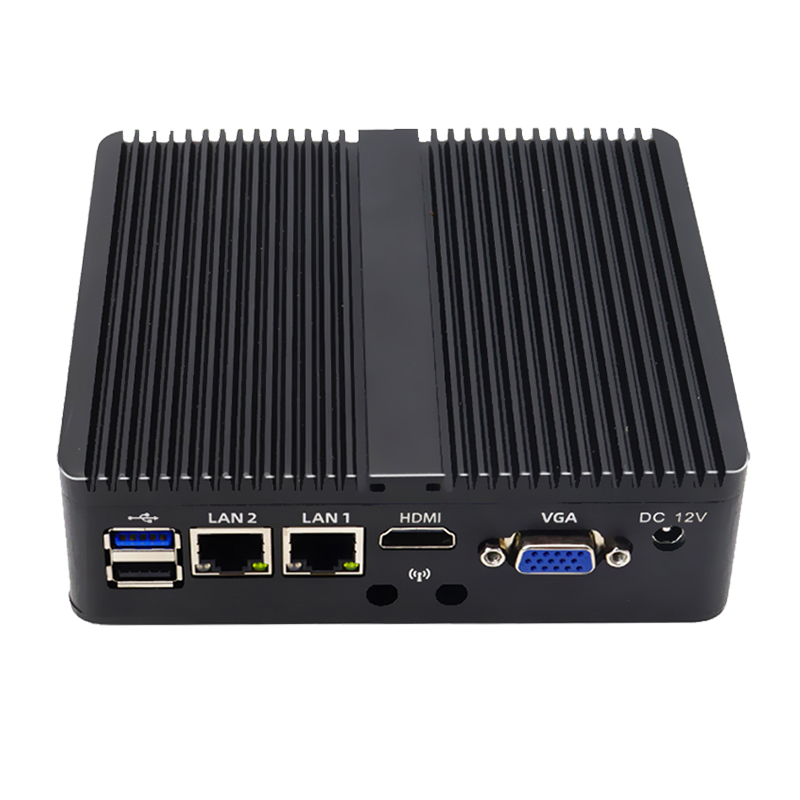
To establish a compliant boundary, system integrators rely on specialized hardware. A dual LAN industrial PC is a robust computing device engineered specifically to bridge disparate networks securely without compromising the underlying infrastructure.
At a fundamental hardware level, this computer features two independent Ethernet ports. Each port is driven by its own dedicated network interface controller. Both connect into a single motherboard. This design differs drastically from standard consumer desktops or unmanaged network switches. A standard switch automatically forwards data packets across all connected devices. A PC equipped with dual network interfaces operates at a higher application layer. By default, the operating system absolutely will not route traffic between the two separate network cards. This creates a strict physical partition. Powered by highly efficient processors like the Intel Celeron, these embedded edge computers handle complex data processing while maintaining absolute network separation.
In modern automation architectures, this PC functions as an application-level gateway. It acts as an intelligent middleman positioned directly between the chaotic factory floor and the enterprise network.
Operating on robust operating systems like specialized Linux distributions, these devices empower engineers to deploy custom software applications directly at the edge. The hardware utilizes its processing power to manage data flow actively. It reads data from one isolated port, processes the payload internally within its secure memory space, and transmits only sanitized data outward through the second port. The two networks communicate exclusively through highly controlled channels.
The foundational principle relies on strict physical and logical separation. The first port is dedicated entirely to the operational technology environment. In practice, this port connects exclusively to local controllers, human-machine interfaces, robotic arms, and machine-level sensors.
To maintain absolute security, engineers configure the first port on a private non-routable IP subnet. Crucially, the network adapter settings are deployed without a default gateway. Without a gateway address specified, it is mathematically impossible for network packets originating on this local port to find a route to the external internet. The controllers remain completely isolated in a secure closed loop.
The second port serves as the external link to the outside world. This interface connects to the corporate IT network, a facility-wide managed switch, or an industrial cellular modem.
This external port operates on an entirely separate IP subnet. It is configured with a default gateway and DNS servers. This specific configuration allows the port to handle all outbound communication to enterprise systems or cloud platforms. External traffic reaches only as far as this second port. It cannot penetrate the motherboard logical barrier to reach the sensitive equipment on the local network.
Because the two ports exist on completely different subnets with routing disabled, this setup acts as a highly functional modern alternative to complete physical isolation. Data only moves between the two networks through software-defined bridging.
The edge computing software running on the PC must explicitly request data from the local network. It pulls the data into memory, translates it, and establishes a completely new secure connection to push the data outward. This architectural design prevents raw uninspected network packets from traversing the divide.
Network Interface | Primary Function | IP Configuration Example | Default Gateway Assigned | External Access |
|---|---|---|---|---|
Port 1 Local Network | Connects to Controllers and Sensors | 192.168.1.50 Static | No | None Isolated |
Port 2 External Network | Connects to Cloud and Corporate IT | 10.0.0.25 DHCP or Static | Yes | Outbound to Cloud |
The primary advantage of deploying an industrial network isolation computer is the drastic reduction of cyber risk. Enforcing physical separation at the hardware level halts network-wide malware propagation instantly.
Imagine a scenario where a corporate IT network falls victim to a sophisticated ransomware attack. The malicious software aggressively scans the network for vulnerable IP addresses to infect. The operational network is hidden entirely behind the multi-port isolation computer. It remains logically unroutable from the IT side. The malware cannot discover, ping, or infect the factory controllers. The operational side of the factory remains secure and functional while the IT side undergoes remediation.
Beyond robust security, these devices optimize data transmission. Sending every single raw data point from a high-speed controller directly to remote servers consumes massive bandwidth. This incurs significant unnecessary hosting costs.
By utilizing local processing power, the PC acts as an intelligent edge node. It aggregates data streams, performs mathematical transformations, and filters out redundancies. Instead of sending a temperature reading every ten milliseconds, the software calculates a one-minute rolling average. It can be programmed to only transmit an alert if the temperature exceeds a critical threshold. This dramatically reduces transmission latency and bandwidth overhead.
Manufacturing floors rarely consist of pristine equipment from a single vendor. A typical facility operates a mix of modern European controllers on the packaging line and legacy Asian systems in the boiler room.
An isolation PC provides universal compatibility to solve this integration headache. Deploying appropriate edge software allows the PC to communicate with various proprietary protocols simultaneously via the local port. It normalizes this disparate chaotic machine data into a single unified local database. It then pushes a standardized clean data stream outward, vastly simplifying the overall enterprise architecture.
The isolation hardware relies heavily on protocol translation to move data securely from the factory floor to the cloud. The journey of a data packet begins on the local port. The edge PC acts as a master client actively polling the controllers using legacy industrial protocols like Modbus TCP or PROFINET.
Once the raw data is ingested into memory, the software translates it into modern IT-friendly formats like JSON. The PC then utilizes the external port to transmit this newly formatted data using secure internet protocols. MQTT secured over TLS or HTTPS REST APIs are industry standard choices. This translation ensures remote servers receive encrypted authenticated data. The local controllers continue operating on their native unencrypted protocols locally without disruption.
Source Protocol Local Network | Edge Processing Action | Destination Protocol External Network |
|---|---|---|
Modbus TCP | Poll Extract Register Format to JSON | MQTT over TLS |
Ethernet IP | Subscribe to Tags Aggregate Data | REST API HTTPS |
PROFINET | Read IO Data Filter Redundancies | Encrypted Message Queuing |
Engineers often implement lightweight databases directly on the isolation PC to ensure high availability and prevent data loss during network outages. If the external internet connection unexpectedly drops, the PC buffers the machine data locally. Once the connection is restored, it automatically forwards the historical data to ensure zero gaps in the analytics dashboard.
Security is further reinforced by configuring built-in operating system firewalls. Network tools are meticulously configured to block all incoming traffic on the external port. They only allow outbound connections explicitly initiated by the edge software.
Deploying standard consumer-grade computers on a factory floor is a costly engineering mistake. Industrial environments feature harsh conditions including airborne particulates, metallic dust, chemical vapors, and constant machine vibration.
A reliable compact routing gateway PC must feature a true fanless architecture. Active cooling fans act as vacuums for dust. They eventually clog internal heat sinks and cause catastrophic thermal failure. Fanless PCs utilize passive cooling by dissipating heat through heavy-duty extruded aluminum chassis designs. This completely eliminates moving parts and significantly increases the mean time between failures ensuring continuous operation in unforgiving conditions.
Factory floors experience severe temperature fluctuations unlike climate-controlled data centers. Equipment positioned near industrial furnaces may face ambient temperatures exceeding 60 degrees Celsius. Devices mounted in cold storage facilities operate in sub-zero conditions. An industrial-grade gateway is engineered with wide-temperature components rated to operate flawlessly from -20 to 70 degrees Celsius.
Power stability is equally critical. Industrial power grids are notoriously unstable. They are plagued by sudden voltage spikes, drops, and electromagnetic interference caused by massive electric motors cycling on and off. A robust gateway PC mitigates this risk by incorporating wide-voltage DC power inputs ranging from 9V to 36V DC. Built-in over-voltage and over-current protection ensures internal circuitry remains shielded from electrical anomalies.
Many manufacturing facilities still rely heavily on legacy machinery despite the prevalence of modern Ethernet protocols. Older drives, computer numerical control machines, and sensors often lack Ethernet support. They rely entirely on serial data transmission.
An effective routing gateway includes rich input and output interfaces alongside the mandatory dual network setup. Isolated RS232, RS422, and RS485 serial communication ports are essential for polling legacy Modbus RTU devices. Digital input and output pins allow the PC to interact directly with hardware relays and physical alarms. This bridges the gap between analog legacy systems and modern infrastructure seamlessly.
Specification Category | Standard Commercial PC | Industrial Gateway PC |
|---|---|---|
Cooling Mechanism | Active Fans susceptible to dust | Passive Fanless sealed aluminum chassis |
Operating Temperature | 10 to 35 Degrees Celsius | -20 to 70 Degrees Celsius |
Power Input | Fixed AC adapter | Wide voltage range 9 to 36V DC with protection |
Network Interfaces | Single LAN | Dual or Multi-LAN Intel controllers |
Legacy Interfaces | USB only | RS232 RS485 Serial Digital IO |
Vibration Resistance | Low due to moving parts | High using solid state drives and soldered components |
The foundational phase of deployment requires meticulous network planning. The goal is to establish a strict hardware barrier at the network layer. Connect the target controllers to an unmanaged industrial switch. Connect that switch to the first port of the edge PC.
Assign a static IP address to the first port that matches the local controller subnet. Ensure the subnet mask is correct but leave the default gateway field completely blank. Omitting a default gateway guarantees the local port possesses absolutely no routing path to the external internet. Connect the second port to the corporate network or cellular modem. Set this port to accept an IP address via DHCP or assign a static IP provided by the IT department. Ensure the default gateway and DNS servers are properly populated to allow internet access. Verify that IP forwarding is disabled at the operating system level.
Software is required to act as the controlled bridge once hardware physically isolates the networks. Install industry-standard data brokering platforms or deploy custom Python scripts directly onto the industrial PC.
Configure the software polling engine to act as a client on the local port. Input the IP addresses of the controllers and specify the exact registers to be read. The edge PC polls the data asynchronously. The data is completely extracted, transformed, and repackaged at the application layer. Malicious IP packets from the IT network cannot traverse down to the operational network. Verify that the software successfully reads operational data without impacting the control loop execution.
The final step establishes the outbound connection on the external port. Configure the cloud endpoint credentials within the edge software.
Enforcing encryption for data in transit is absolutely critical. Implement TLS certificates within the edge software to ensure the payload is encrypted before it ever leaves the external port. Configure the system to utilize outbound MQTT or HTTPS. The connection is initiated from the PC outwards. The corporate firewall will typically allow the traffic without requiring any risky inbound ports to be opened. This maintains a hardened security posture.
Integrating IT and OT networks requires careful planning. You do not have to compromise on security to achieve digital transformation. A dual network industrial PC provides the essential physical separation needed to keep critical infrastructure safe from evolving cyber threats. Acting as a smart protocol-translating gateway, this hardware allows essential operational data to reach remote analytics platforms seamlessly. It maintains an impenetrable barrier against external intrusions.
Ready to protect your factory floor and bridge the data gap securely? Explore a wide range of rugged, fanless embedded computers tailored for strict network isolation. Visit MeetIPC to find the exact industrial computing hardware that fits your specific deployment needs. Ensure your production data remains both highly accessible and completely secure today.
Virtual local area networks provide logical separation but they are inherently insufficient for critical operational cybersecurity. VLANs rely entirely on software configurations within a single physical switch. A single misconfiguration by an administrator or a firmware bug can easily bypass this logical separation. This exposes the entire control network to the corporate internet. A dual network PC provides physical hardware separation at the network interface level. If the IT network is compromised by ransomware, the physical barrier ensures malicious software cannot route itself into the isolated subnet.
A standard network router operates at Layer 3 of the OSI model. Its primary function is to automatically find paths and pass IP packets between different networks. If a router connects an IT and OT network, it inherently wants to route traffic between them. This introduces severe security risks. An industrial network isolation computer runs a full operating system and actively blocks direct IP routing. It terminates the connection at the application layer. It extracts the payload from a packet on one port, repackages it entirely, and sends it out the other port. No original network packets cross the boundary.
Introducing an edge gateway will not impact operational latency. Controllers operate on strict real-time scan cycles to manage physical machinery. The edge PC does not interrupt or participate in these control loops. It utilizes asynchronous polling instead. The gateway simply reads a copy of the data registers in the background. Because the edge PC passively reads data rather than injecting control commands, automation tasks continue with zero added latency.
A single edge gateway is highly scalable. You do not need a separate PC for every controller on the floor. You can connect the local-facing port to an unmanaged industrial switch. This switch can then connect to dozens of controllers, interfaces, and variable frequency drives across the local subnet. The gateway software can run multiple concurrent polling threads communicating with various brands simultaneously. It aggregates all disparate data into a single unified database locally before transmitting an efficient consolidated stream outward.
Standard IT firewalls are designed to inspect and filter traffic based on IP addresses and ports. However, they still fundamentally route packets between networks. Relying solely on a firewall in industrial environments leaves a logical path open. If a vulnerability is found in the firewall firmware or an overly permissive rule is created by accident, hackers can pivot directly into the control network. A dual network PC with disabled IP forwarding removes this routing path entirely. It offers a much stronger physical barrier against advanced persistent threats.
Ransomware spreads by actively scanning routable subnets for vulnerable operating systems and open network shares. When you deploy a dual network PC, the production network resides on a completely hidden non-routable subnet without a default gateway. Even if ransomware fully infects the corporate IT network connected to the external port, the malicious code cannot ping, discover, or traverse to the local controllers. The physical separation at the hardware level starves the ransomware of a path to the production line.


